Vuhuru

Add your Google Cloud account to MyCDNs


Step 1

Log into the Cloud Console

Go to https://code.google.com/apis/console/

(Log into your Google account if you haven't already)

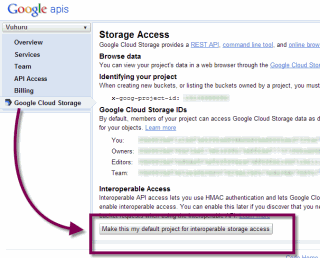
Click on Google Cloud Storage in the left hand list

Then click the button at the bottom: Make this my default project for interoperable storage access


Step 2

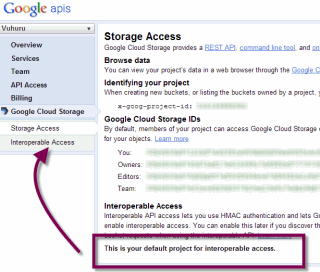
You receive confirmation that the setting has been applied

A new option appears in the left column: Interoperable Access

Click on this new link

Step 3

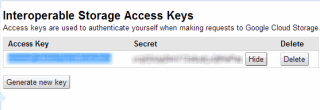
Your Access key is shown

You need to click on the Show button to reveal your Secret key

Keep this page open and continue to Step 4

Step 4

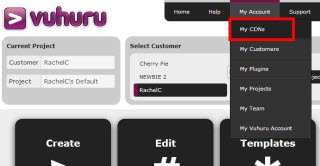
Click on My Account in the header at Vuhuru

Choose MyCDNs from the drop down

Step 5

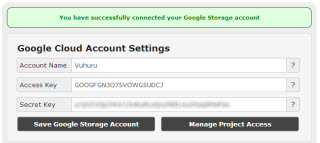
Enter your details into the Google Cloud section

Account name: Will only be used at Vuhuru, to help you distinguish between multiple Google Cloud accounts

Copy and paste your Access Key and Secret Key from Step 3

Click Save Account to apply settings

You get a green confirmation message that this has been successful

© 2012 - 2026 Vuhuru Ltd. All Rights Reserved. Reproduction without permission prohibited.
Vuhuru 1-003