Vuhuru

Add your RackSpace account to MyCDNs

Create players quickly by connecting your RackSpace hosting account to MyCDNs in Vuhuru - this allows you to make players in less than 10 seconds!


Step 1

Login to your RackSpace account

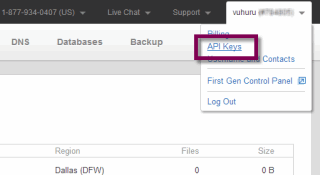
Click on your username/user number in the top right corner

Select API keys from the dropdown


Step 2

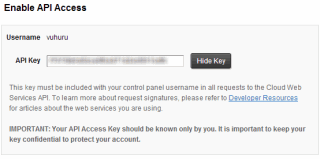
The Enable API Access dashboard shows

Click on Show Key button

Copy the revealed API key

Step 3

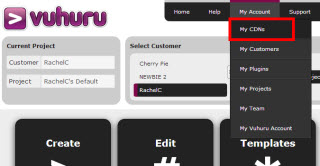
At the Vuhuru website, click on My Account in the header

Choose MyCDNs from the drop down

Step 4

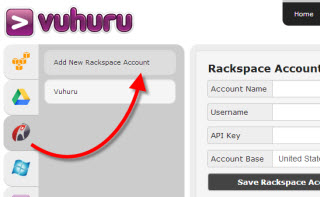
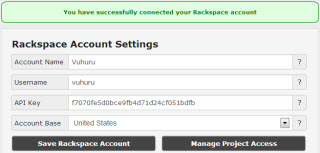
Select RackSpace from the available CDNs

Account name: Will only be used at Vuhuru, to help you distinguish between multiple RackSpace accounts

Username: Copy the user name from the API daskboard in RackSpace (see image in Step 2)

Secret key: This is where you paste the API key you copied in Step 2

Account base: Select either UK or US depending on which service you signed up for

Once you have filled all four fields, click Save RackSpace Account

Step 5

You get a confirmation message that your RackSpace account has been linked to your Vuhuru account

You can now create players in less than 10 seconds!

© 2012 - 2026 Vuhuru Ltd. All Rights Reserved. Reproduction without permission prohibited.
Vuhuru 1-003