The End Action Feature
Re-direct at the end of your video to any webpage or instead replace content and show a Buy Now button, a PayPal button, an opt in form, an image, a table... in fact any HTML code you want! Carry on reading to learn more...
What is the End Action Feature?
The End Action Feature allows you to make your videos more powerful by offering an action at the end of your video - so you can choose what your viewer does next
... You can show your viewer a sign up form and grow your list.
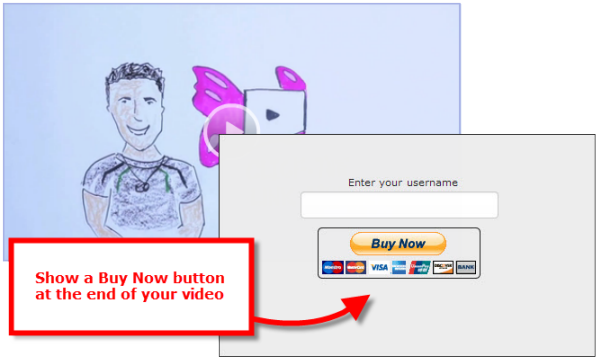
Or you can have a buy now/PayPal/shopping cart button appear and close the sale.
... Or show an image or code such as a coupon or voucher and track the effectiveness of sales videos.
Or you can re-direct them to another webpage - great for videos on your affiliate pages as this drives traffic to your site and straight to the page you want - not requiring a click-through.
Offer your viewer to purchase an item; to sign up for your newsletter or re-direct them to a squeeze page - its totally flexible
What can I show using the End Action Feature?
The End Action will show just about any HTML code, so you can show a form, an image, a linking button or re-direct to a URL
Check out the two options below
How do I use the End Action Feature?
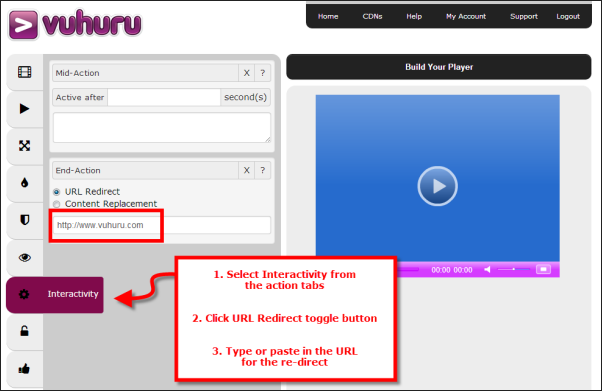
Option #1 - URL Re-direct
When your video finishes, the viewer will be automatically re-directed to another page
To apply a re-direct, click the Redirect toggle
Then enter the full web address of where you would like to re-direct to, including the http: //www.
You can preview how this will work after you have built your player
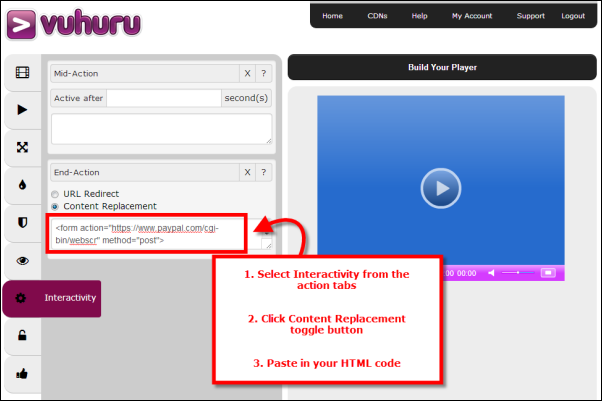
Option #2 - Content Replacement
Select this option to show an opt in form, a linking button or similar at the end of your video Click the Replace Content toggle Paste in the raw HTML code
**Use HTML code only - do not use Javascript as this may stop your video from working**
The raw HTML code can be for showing a:-
- PayPal button
- Buy Now button
- Opt in form
- Image
- Llinking image
- Table
- Survey
- Coupon
- Questionnaire
- Linking button
You can preview how this will work after you have built your player
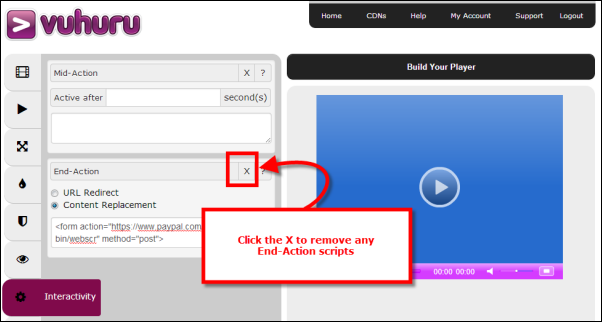
How do I remove an End Action?
To remove an End-Action from your player, just click on the X
|