Vuhuru

Video File Permissions in Amazon S3

Learn how to set your file permissions so that your viewers can watch your videos - this guide will help you fix error messages such as 'file not found' or 'you do not have permission to watch this video' and 'error 2032.'

Step 1 - Sign in to your AWS account

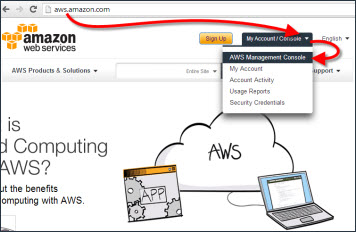
Go to aws.amazon.com and click on My Account/Console

Then select AWS Management Console from the drop down

Sign in to your account

Step 2 - Open S3 interface

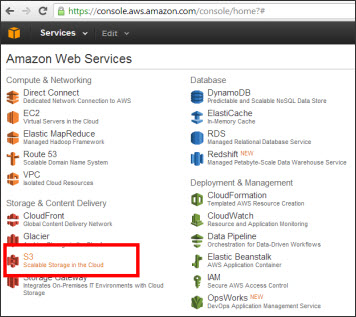
Click on S3 from the options under Storage & Content Delivery

This will open the S3 interface

Step 3 - Find your video file

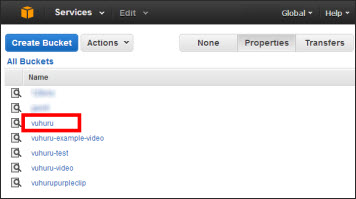
You will see a list of your buckets

Click on the one you want to find your file

Step 4 - Open properties

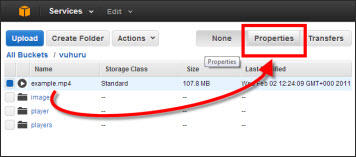
Once you have the file you want, click on the Properties tab in the top right

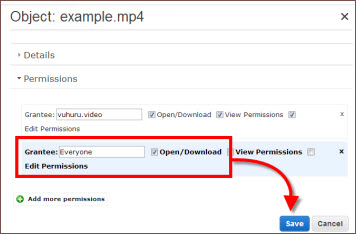
Step 5 - Set permissions

Check that your file has the correct permissions

They should be as is shown across in the image

YOUR USERNAME - File permissions - Open/Download, View Permissions and Edit Permissions

EVERYONE - File permissions - Open/Download ONLY

If this is not correct, just click on the toggle boxes to change and click on Save

© 2012 - 2026 Vuhuru Ltd. All Rights Reserved. Reproduction without permission prohibited.
Vuhuru 1-003