Vuhuru

Create and embed players with the Vuhuru plugin for MemberGate


Step 1 - Create a player

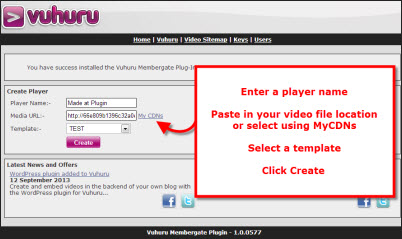
Once your plugin is uploaded and successfully activated, you will be able to create a player

Enter a name for your player (this is for your own account management only and is not seen by your viewers)

Either paste in your video file location, or select your video from MyCDNs

Finally, choose a template from the dropdown

You can only create players at the plugin by using templates; here is the guide on making templates if you do not yet have one

Once you have completed the three easy steps, click on Create


Step 2 - Preview your player

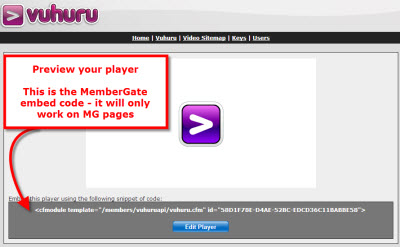
Your new player will appear in a few seconds

You can preview how it will look and work on your site, click on any logos etc to make sure they direct to the webpage you want

You can edit the player by applying a different template; simply follow the edit section below the player

You can also delete the new player

Once you are happy with it, you can embed your player on a webpage

Start by copying the embed code underneath the player

Step 3 - Add or edit a content page

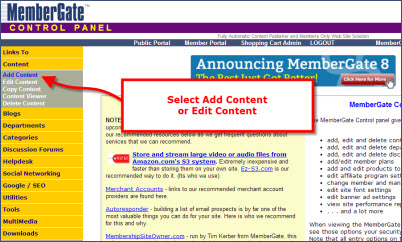
Open the MemberGate Control Panel in a new tab or window

Navigate to Add Content or Edit Content on the left hand side under Content

Step 4 - Paste your embed code

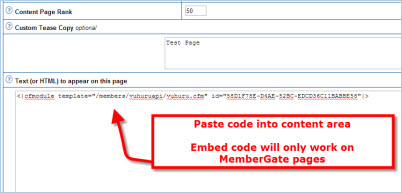
Paste the embed code into the Text or HTML area

Note that the embed code is automatically locked down to the domain where you created the player - so if you have several MemberGate sites, you will need to create your player at the site you wish to embed it on

Also, your code is a specific MemberGate embed code and will only work on MemberGate pages - if you have a front-end blog such as WordPress for your MemberGate site, the embed code will not work there. You can either create another player at Vuhuru, or use one of our blog-specific plugins

Click Add Page or Apply changes to this page at the bottom of the page when you are ready

Step 5 - Preview your webpage

MemberGate applies changes on the fly to webpages, so you can preview your results instantly

You can check that the player is the correct size for your webpage and works well with the other content

Any changes you apply to the player at the plugin or the live site will automatically be applied to the embedded player

This is a clever feature that you can use to update pages without having to re-embed code each time - its a quick and easy way to change content, layout, colour or styling of your videos

Simply edit the player in the plugin by applying a new template, all changes will be instantly and automatically applied


© 2012 - 2026 Vuhuru Ltd. All Rights Reserved. Reproduction without permission prohibited.
Vuhuru 1-003