Vuhuru

Update your players by applying a template

If you want to apply the same changes to many players at once, then an easy way to do it is by using a template.

This is a quick and easy method if you:-

    • are starting or ending an offer
    • If you want to add an offer or coupon to your videos in the End Action, then you can insert it or remove it by using a template
    • want to use a new start screen
    • You may have a new image that you want to show before your video starts, which will show as a holding image on your webpage
    • have updated your logo
    • For either a new logo or if would like clicking on it to divert to a new URL
    • developed a new sign up form
    • Changes to which list you would like people to join or the details you are collecting


or for any other changes you wish to apply!

**Please note that updating a template will not automatically update the players created using it - a changing a cookie cutter won't change the cookies that you have already made - Vuhuru players follow the same principle**


Step 1 - Create a template

The first step is to create a template.

Follow this guide to learn how to create a template if you haven't already done this.


Step 2 - Check your template

If you have already created your template, you can check that it has the right settings.

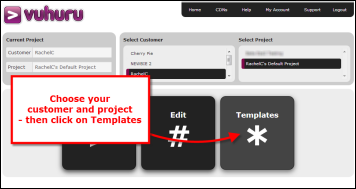
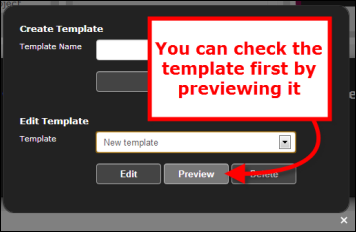
Just click on the large Templates button on the home page and Preview your template.

Once you are sure you have the right template, go back to the home page.

Step 3 - Open Edit Player

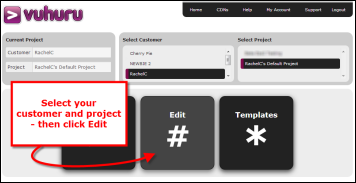
In the home page, select your customer and project.

Then click on the large Edit button.

This will open the pop-up.

Step 4 - Select your player and template

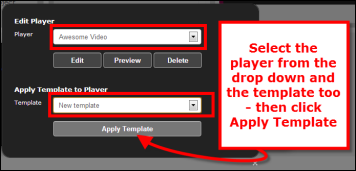
Select the player you wish to update and the template from the dropdown lists.

Make sure you have the right ones, as once you apply changes, they cannot be undone.

If you are unsure, see Step 2.

Once you have the right player and template, click Apply Template.

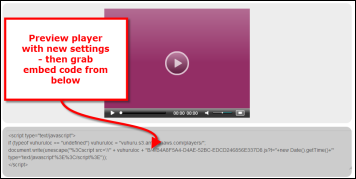
Step 5 - Preview and embed

Your changes are immediately applied - in just one click!

You are taken straight to the player preview.

Here you can watch the video and check your changes.

Grab the embed code from below the player to put on your webpage.

© 2012 - 2026 Vuhuru Ltd. All Rights Reserved. Reproduction without permission prohibited.
Vuhuru 1-003