Vuhuru

Using the Lightbox player

How to use the lightbox player to create videos that pop up and show over the top of your webpage

Step 1 - Select layout and choose lightbox player

Go to create player from the main page as normal

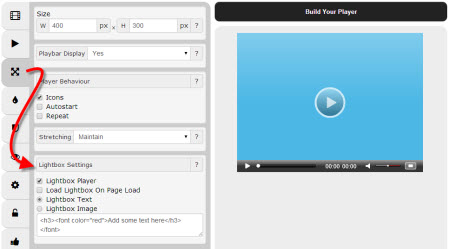
Select layout on the left-hand side

Click on the lightbox player toggle

Choose between:-

  • Option 1: Load Lightbox On Page Load
  • - player will appear over the top of your page as soon as the page loads
  • Option 2: Lightbox Text
  • - clickable text shows on your page, click to launch the player
  • Option 3: Lightbox Image
  • - clickable image shows on your page, click to launch players

Step 2 - Option 1: On Page Load

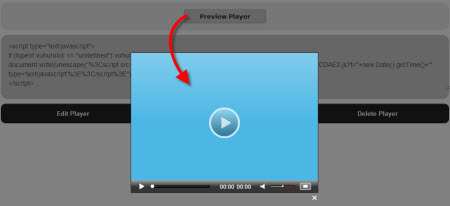
If you choose On Page Load the player will show as soon as the page loads, over the top of all other content on the page

Click on Build Player to preview your player

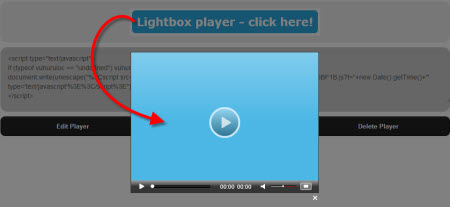
The page is greyed out

The player appears over the top of the rest of the content on your webpage - making it unmissable!

Embed your player as normal

Step 3 - Option 2: Clickable text

If you choose Lightbox text, enter some text

Then enter some HTML commands if you would like to change the look of the text

Help on HTML formatting commands here at W3 schools

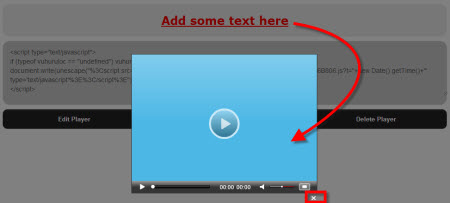
Click on Build Player to preview your player

Click on the text to view your player

Embed your player on your webpage as normal

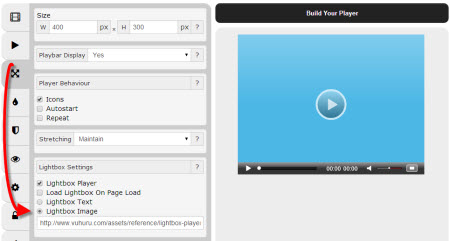
Step 4 - Add image URL

Alternatively you can choose to use an image

Just paste in the URL of an image you have uploaded to your CDN or server

Click on Build Player to preview your player

Step 5 - Option 3: Clickable image

Click on the image to launch your pop-up video

As with clickable text in Step 3, the content is greyed out

The player appears over the top of the rest of the content on your webpage - making it unmissable!

Embed your player on your webpage as normal

© 2012 - 2026 Vuhuru Ltd. All Rights Reserved. Reproduction without permission prohibited.
Vuhuru 1-003