Vuhuru

Create and embed players with the WordPress Plugin

Step 1 - Upload and activate your plugin

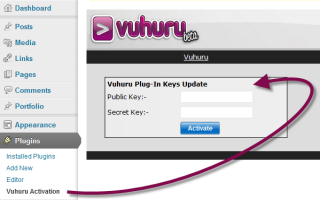
Make sure that you have uploaded, activated and generated keys for your plugin before you use it.

Here are the guides on:-

Uploading your plugin

Activating your plugin

Generating your keys

Step 2 - Plugin options

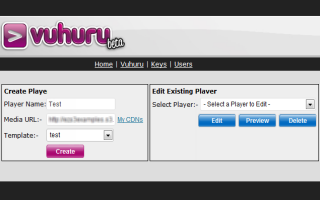
Once your plugin is active, you will see options to create, edit and delete players

*If you are on a VA plan, you will only see players and templates which are in active projects for this plugin site*

Any actions you take here will be applied back at Vuhuru, so if you delete or edit a player here, the same changes will be made at the main Vuhuru site

Any players you edit or delete will also be affected wherever they are embedded (i.e. whatever websites they are playing on)


Step 3 - Create a player

You can create new players by using a template (guide on templates - click here)

Start by entering a player name

Then either paste in the video URL, or use My CDNs to find your video file

Then select a template to use to create your player

Click on Create - you can preview the player that you have created

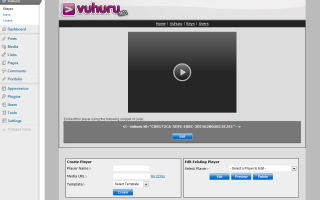
Underneath the player are options to re-edit this player, edit a different one or create a new player

Step 4 - Preview new player

Directly underneath your player is the embed code

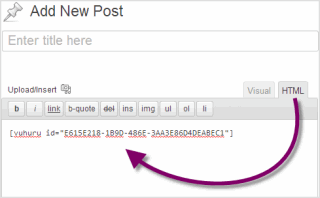
Simply copy and paste into a blog page or blog post - making sure you have the HTML tab chosen

Step 5 - Embed player on blogpost

Hey Presto!

Your player is playing on your blog!

© 2012 - 2026 Vuhuru Ltd. All Rights Reserved. Reproduction without permission prohibited.
Vuhuru 1-003