The Vuhuru Overview - A Step by Step Guide to Vuhuru
The step by step guide below will take you through each stage from creating and uploading your video, to adding interactivity with the Mid Action and End Action features
Learn how to use templates and plugins to create and embed videos in seconds; then how to track your success
Click on one of the headers to learn more
| VUHURU OVERVIEW |
|
1. How does Vuhuru work?
|
|
|
Vuhuru works like this:-
- You upload and store all your media wherever you like
- Get the file location of your video
- Paste this link into Vuhuru
- Choose your video settings including interactivity
- Paste the embed code on your webpage
Then your video is good to go!
Check out the tutorials on each of the steps in the table below
|
|
2. Sign up for storage
|
|
|
With media storage you have 3 options:-
- Content Delivery Network (CDN)
A content delivery network is a great hosting solution; they can usually offer the cheapest bandwidth for your media, are usually scalable, so increased demand can be met and can be pay-as-you-go, so you only pay for what you have used
Check out Amazon S3, Google Cloud, RackSpace and Windows Azure
- Hosting account
You can upload your media to an existing hosting account. But you should be aware of any maximum bandwidth clauses, fair usage policies and flat rate fees, paying for storage you might not be using
- Own server
If you have your own server you may consider storing your media here; just be cautious of spikes in traffic that might overload your server capacity
|
|
3. Creating your MP4 video
|
|
|
The accepted file types for Vuhuru are MP4 video and MP3 audio.
When creating an MP4 video there are some common problems to avoid:-
- Metadata - the play/pause/rewind etc instructions are at the end of the video file
If the instructions for your file to play are at the end of your file, then it will not play until the whole thing has loaded. This can make it seem like your video is not playing at all. Learn how to solve this problem
- Codecs - MP4 videos must be encoded using the correct codecs
If you do not use the right codec, only the audio or only the video may play - or the screen may appear black. Learn more about codecs here
- iPad/iPhone - Want your videos to play on iWare such as iPads and iPhones?
You must encode to within Apple's specifications for iWare if you want iPad and iPhone users to be able to watch your video. Learn how to encode to iWare specs
|
|
4. Get the file location
|
|
|
Once you have created your video, signed up for storage and uploaded your video - you need to get the file location to create a player.
Here are the guides for getting the file location for:-
|
|
5. Create a player
|
|
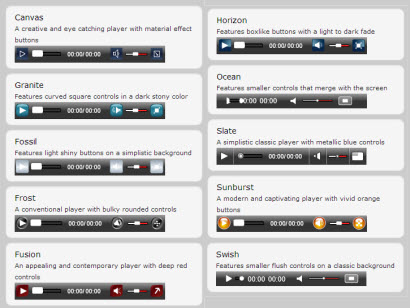
Vuhuru has some great player features - learn more about the Mid-Action and End-Action Features below.
Other features of the Vuhuru player include:-
- choose from 12 unique Vuhuru player skins
- change the width and height of your player
- change the colours of the screen, playbar and font
- add a start screen to show at the beginning of your video
- add your own logo and turn it into a link to any URL
- use Google Analytics to track your stats (more below)
To learn how to create a beautiful player for your video, click here
|
|
6. The Mid-Action Feature
|
|
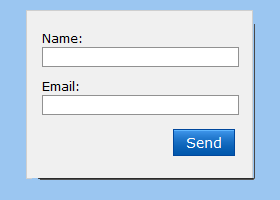
The Mid-Action Feature allows you to make your video interactive
Grow your list by showing your opt-in form at any point in the video, which won't disappear until your viewer enters their details
You choose the point at which your form shows - it could be just before your juiciest part, before you make an offer or give your secret tip
Use your opt-in form to get your viewers' details, so you can interact with your audience through more than your video
To find out how to get your opt-in form code, click here
Then learn how to use the Mid-Action Feature here
|
|
7. The End-Action Feature
|
|

The End-Action Feature allows you to add interactivity at the end of your video
With the End-Action Feature you can:-
- show a PayPal button
- show a Buy Now button
- redirect to any URL - like a squeeze page
- show an image
- show a table
- show an opt-in form
- show a coupon
Learn how to use the End-Action Feature by clicking here
|
|
8. Embed your player
|
|
|
Now you have made your video player - you want it to play on your website
Find out how to embed your video onto your webpages
If you are using a WordPress blog or MemberGate website, you can do this even more easily with plugins
|
|
9. Check out your stats
|
|
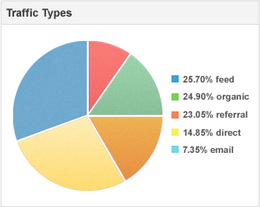
Vuhuru allows you to grasp the power of Google by using Google Analytics to track your players
Want to...
- see how much of your video is being watched?
- know how many viewers you have?
- find out if your video is being re-watched?
- discover which countries your viewers are from?
- split-test and compare your stats?
All of this (and more!) is possible with Google Analytics
Find out how to get to grips with Google Analytics and harness the power of accurate and detailed stats for your videos.
|
|
10. Templates
|
|
|
Want to quickly create a series of players for one site? Or want to re-use common settings?
With Vuhuru you can create, edit and keep templates of your favourite settings
Then with one click, create a player for your video - quick and easy
Find out more here
|
|
|



